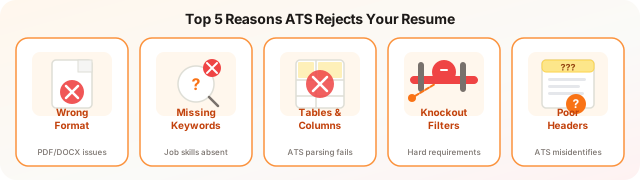
Resumes fail ATS screening for 8 main reasons: missing exact keywords from the job description, incompatible file formats such as design-tool PDFs where text renders as images, two-column or table-based layouts that scramble extraction, missing or non-standard section headers, year-only date formats that break experience calculations, unlisted certifications that fail knockout filters, generic skills lists, and applying where hard minimums are unmet. All 8 are fixable before any content is rewritten.
Resumes fail ATS screening for eight main reasons: missing exact keywords from the job description, incompatible file formats (such as design-tool PDFs that render text as images), two-column or table-based layouts that scramble text extraction, missing or mis-formatted section headers, year-only date formats that break experience calculations, unlisted certifications that fail knockout filters, generic skills lists without matching role-specific terms, and applying to roles where you do not meet hard minimum requirements. Fixing these technical issues improves pass rates before any content changes are made.
You spent two hours on your resume. You tailored it to the job description. You sent it in, and heard nothing. No rejection, no interview, just silence.
There is a high probability your resume was never read by a person.
The 75% Statistic: What It Actually Means
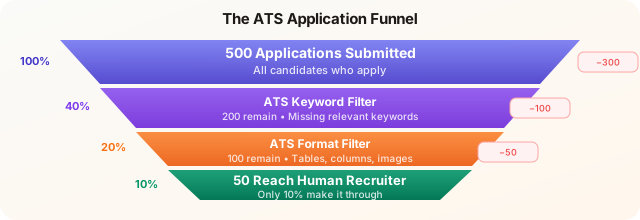
The oft-cited figure that 75% of resumes are filtered out by ATS before a human sees them requires some context to be useful.
That number applies most accurately to high-volume roles at mid-to-large companies: think entry-level corporate positions, major tech companies, large financial institutions, and any role that receives hundreds or thousands of applications. A software engineering role at a Fortune 500 company posted on LinkedIn will commonly see 500–2,000 applicants within 48 hours. Without automated filtering, the recruiting team would need weeks just to sort the pile.
For specialized or senior roles, a VP of Engineering, a niche biotech researcher, a partner-track attorney, the dynamic is different. Applicant volume is lower, headhunters often source candidates directly, and ATS filtering is less aggressive. The rejection rate from automated screening in those contexts might be closer to 40–50%.
Why this matters: If you are applying to volume roles at large organizations, the ATS is not a formality, it is the primary gatekeeper. Optimizing for it is not gaming the system. It is the minimum requirement for your application to exist. Understanding how ATS systems actually work is the foundation for fixing the problems below.
The 8 Reasons Your Resume Fails ATS Screening
1. Missing Exact Keywords from the Job Description
ATS systems match your resume text against the words in the job description. The most common and damaging mistake is assuming that a synonym or a more sophisticated term will substitute for the exact phrase the job description uses.
If the posting says “stakeholder management” and your resume says “executive relationship building,” many ATS configurations will not make that connection, regardless of how accurate the description is.
The fix is straightforward: use the exact phrasing from the job description where it accurately reflects your experience. The ATS keywords guide walks through how to extract and prioritize the right terms for each application. The ATS keywords guide walks through how to extract and prioritize the right terms for each application.
2. Incompatible File Format or Encoding
The safe default for ATS submission is a standard .docx file or a plain PDF. The complication with PDFs is that not all PDFs are equal. A PDF exported from a design tool like Canva or Adobe InDesign often embeds text as vector paths or image data, meaning the ATS cannot extract the text at all. Your resume is effectively an image.
Rule of thumb: Generate your PDF from Microsoft Word, Google Docs, or a purpose-built resume builder that exports machine-readable PDFs. If you are not certain, submit .docx when both options are available.
Also watch for encoding issues. Certain special characters, typographic apostrophes, em dashes, bullets from non-standard fonts, can parse as garbled characters or break text extraction entirely. Use plain UTF-8 characters.
3. Complex Formatting: Tables, Columns, and Text Boxes
This is the formatting mistake that catches the most people in 2026, because visually sophisticated resume templates are widely available and look impressive to human eyes.
The problem is structural. When ATS software reads a two-column resume, it typically reads left-to-right across the full page width. Your left column skill gets merged with your right column job title mid-sentence. The result is garbage text that no keyword matching can parse correctly.
The same applies to:
- Tables: Cell content often reads in an unpredictable order
- Text boxes: Frequently skipped entirely by the parser
- Headers and footers: Contact information placed in a document header is often completely ignored, meaning the ATS may not even capture your name or email correctly
2026 note: Some newer, AI-powered ATS platforms, Greenhouse’s latest parsing engine, Lever, and a few others, have improved multi-column handling meaningfully. But Workday, Taleo (Oracle), iCIMS, and SuccessFactors (SAP) collectively process the majority of enterprise applications, and their parsers remain poor at non-linear layouts. When you do not know which ATS a company uses, assume the conservative case. The ATS resume format guide shows exactly which layouts and elements parse reliably across all major platforms.
4. Non-Standard Section Headings
ATS software is trained to recognize canonical section headings. “Work Experience,” “Professional Experience,” “Experience,” these work. “My Journey,” “What I’ve Built,” “Where I’ve Been,” these do not.
The system needs to correctly categorize your content. If it cannot identify that a section is your work history, the experience inside it may not be attributed correctly to your chronology, job titles, or duration in roles.
Stick to standard headings: Summary, Experience (or Work Experience), Education, Skills, Certifications. Creative alternatives cost you more than they help.
5. Missing or Inconsistent Date Formats
ATS systems extract employment dates to calculate tenure, identify gaps, and build a timeline. Inconsistent or incomplete date formatting creates parsing errors.
Use a consistent format throughout: “Month YYYY” (e.g., “March 2023 – Present”) or the abbreviated version (“Mar 2023 – Present”). Mixing formats, “2022” for one role and “January 2023” for another, introduces ambiguity that some parsers handle badly.
Omitting dates entirely for certain roles is worse. The system may assume those positions are concurrent with others, inflating your apparent experience in a way that creates discrepancies during the human review stage.
6. Unexpanded Abbreviations
“MBA” is not the same as “Master of Business Administration” to a text-matching algorithm unless the ATS has been configured to treat them as synonyms, and not all of them are.
The same applies to job-specific abbreviations: “PMP” versus “Project Management Professional,” “RN” versus “Registered Nurse,” “GAAP” versus “Generally Accepted Accounting Principles.”
The solution is to write both: “Project Management Professional (PMP)” at first mention. The spelled-out version catches the literal keyword match; the abbreviation catches queries that use the short form. This takes thirty seconds and eliminates an unnecessary risk.
7. Graphics, Logos, and Photos
Resume templates that include your headshot, a company logo, or graphical skill indicators (those horizontal bars showing you are “85% proficient in Excel”) present two problems.
First, the images are ignored by the ATS. Any text that is embedded in or overlaid on an image does not exist to the parser. Second, images add file size and can trigger malware screening flags in some enterprise environments, causing the email or upload to be blocked before it reaches the ATS.
Remove all images from your ATS-submitted resume. If you want a visually rich version for human networking contexts, maintain a separate design-forward file and never submit it through an online application portal.
8. A Weak or Missing Skills Section
The dedicated skills section is one of the highest-signal areas of your resume for keyword extraction. Many ATS configurations specifically parse this section to populate a candidate’s skill tags in the recruiter database.
A common mistake is burying skills only within job description bullets, where they appear in context but may not be extracted as discrete competencies. A separate, well-structured skills section, listing tools, technologies, methodologies, and domain expertise, ensures those terms are captured cleanly.
For technical roles, organize by category: Programming Languages, Frameworks, Cloud Platforms, Databases. For non-technical roles: Core Competencies, Tools, Methodologies. Keep entries specific, since “data analysis” is weaker than “SQL, Python (pandas), Tableau, Excel (pivot tables).” For detailed guidance on structure and content, see the resume skills section guide.
ATS compatibility checklist — fix these before submitting:
- Single-column layout (no tables, no text boxes)
- Standard section headers (Experience, Education, Skills)
- PDF exported from Word or Google Docs (not a design tool)
- Contact info in document body, not header/footer
- Dates formatted consistently (Jan 2023 – Mar 2024)
- No images, graphics, or embedded objects
- Skills section present and explicitly labeled
- File under 5MB
How to Diagnose What Is Hurting Your Resume
The most direct diagnostic is the copy-paste test: open your resume file, select all text, and paste it into a plain text editor like Notepad (Windows) or TextEdit in plain-text mode (Mac).
What you see is approximately what a basic ATS parser sees. Look for:
- Is your name and contact information present and intact?
- Do your section headings appear correctly?
- Is the text in the right reading order, or does column content appear jumbled?
- Are there garbled characters, especially near em dashes or bullet points?
- Is any content missing entirely? (Signs of text boxes or image-embedded text)
If the plain-text output is clean and readable, your formatting is likely ATS-compatible. If it is a mess, that is the first problem to fix, before you address keywords at all.
What to Do Next
Start with structure. A clean, single-column, standard-section resume in a machine-readable format is the foundation everything else depends on. If your formatting is broken, keyword optimization on top of it is wasted effort. Then work through these 15 proven ways to beat ATS screening to address keywords, scoring, and common mistakes.
Then address keywords. Read the specific job description for each role you apply to and verify that the critical terms appear in your resume, not just their equivalents. Tools like ATS CV Checker let you paste a job description alongside your resume and surface exactly which required keywords are missing or underrepresented, so you are not guessing.
Finally, do not optimize for ATS at the expense of readability. Recruiters and hiring managers who read your resume after it clears the filter still need to find it compelling. The goal is a document that passes automated screening and reads well to a person, both, not one at the cost of the other.