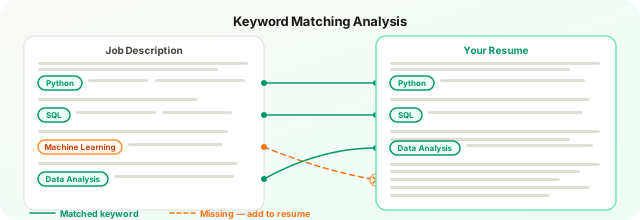
The right ATS keywords come directly from the job description, prioritized by where they appear. Requirements listed first carry the highest scoring weight. Required skills need exact-match language in your summary, skills section, and at least one experience bullet. Preferred skills need coverage but not repetition. Semantic matching bridges synonyms in modern systems but cannot substitute for exact matches on high-priority terms where employers may set knockout filters.
The right ATS keywords come directly from the job description, prioritized by where they appear - requirements listed first carry the highest scoring weight. Required skills need exact-match language in your summary, skills section, and at least one experience bullet. Preferred skills need coverage but not repetition. Semantic matching helps bridge synonyms in modern systems, but cannot be relied on for high-priority terms where the employer may have set exact-match knockout filters.
Keyword optimization is the most widely discussed aspect of ATS resume writing and also the most widely misunderstood. Most advice on the topic reduces to “include keywords from the job description,” which is correct but incomplete. The harder questions are: which keywords, placed where, at what frequency, and in what form?
This guide answers those questions specifically.
Why Keywords Matter and How ATS Has Changed the Scoring Game
To understand why keywords carry so much weight, it helps to know how ATS systems evaluate resumes. For most of the past two decades, ATS keyword matching operated on simple term frequency: does this word appear in the resume, and how many times? Systems like Taleo and early versions of iCIMS essentially compared a list of required terms against a list of terms in your document.
That model has not disappeared, it still underlies the screening logic in the most widely deployed enterprise ATS platforms. But layered on top of it, particularly in platforms adopted by tech companies and startups since 2023, is a second layer of semantic understanding. These systems can infer that a candidate who writes “built RESTful APIs using Express.js and deployed to AWS Lambda” likely has backend development experience, even if the word “backend” does not appear.
Semantic matching helps you, but it does not replace exact matching for high-priority terms. If a role requires “Salesforce” and you have written “CRM platform experience,” modern AI-assisted ATS may make that connection, or it may not. The hiring manager who configured the screening rules may have set “Salesforce” as a hard-filter term. You cannot know. The safer approach is to include the exact term alongside any semantic descriptions.
Do not rely on semantic inference for the skills that appear most prominently in a job description. Use exact language for those. Rely on context and description for everything else.
The order in which requirements appear in a job description is itself a signal. What the hiring team listed first is almost always what they care most about, and ATS configurations typically reflect those priorities. A required skill mentioned in the opening bullet carries more scoring weight than one buried at the bottom of the preferred qualifications.
How to Extract Keywords from a Job Description: Step by Step
This process takes 15–20 minutes per application. Done correctly, it consistently outperforms generic resumes.
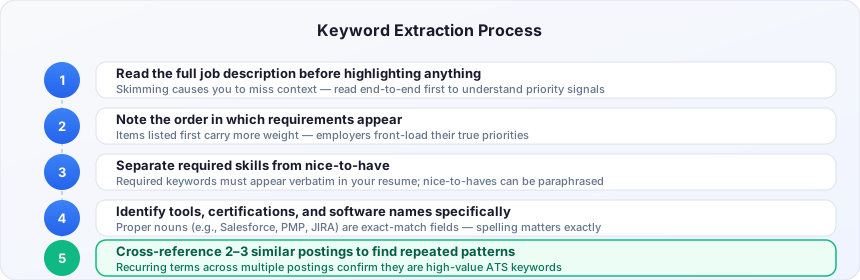
Step 1: Read the Full Job Description Before Highlighting Anything
Recruiters and HR teams write job descriptions under time pressure, which means the structure is rarely perfect. Important requirements appear in unexpected places, buried in the “nice to have” section, embedded in a paragraph about team culture, or mentioned once in passing.
Read the entire posting before you start pulling keywords. You are building a mental model of the role, not just scanning for vocabulary.
Step 2: Note the Order of Requirements
The sequence in which requirements appear is a signal of priority. ATS configuration typically reflects what the hiring manager told the recruiter was essential. What appears in the first two or three bullet points of “Requirements” or “Qualifications” is almost always more critical than what appears at the end.
Required qualifications listed first should appear multiple times in your resume, in the summary, in the skills section, and in experience bullets. Terms listed toward the bottom, or under “preferred” rather than “required,” are lower-priority targets.
Step 3: Identify Required vs. Preferred Skills Explicitly
Most job descriptions use signaling language:
- Required / Must have / Essential - non-negotiable for initial screening
- Preferred / Nice to have / Bonus / Plus - differentiation factors after initial screening
- Familiar with / Exposure to - baseline awareness is sufficient
Organize your keyword list into these categories. Allocate your resume real estate accordingly. Missing a “required” keyword is costly. Missing a “preferred” keyword matters less, especially if you have the required ones covered.
Step 4: Identify Industry-Specific Jargon, Tools, and Certifications
General terms like “leadership” and “communication” are low-signal to ATS. Specific tools, platforms, methodologies, and certifications carry much more weight because they are less common across the candidate pool.
For each job description, pull out:
- Named tools and platforms (Salesforce, Jira, Databricks, Figma, Workday)
- Specific methodologies (Agile, Scrum, OKRs, Six Sigma, ITSM)
- Certifications (PMP, CPA, CISSP, AWS Solutions Architect, Google Analytics 4 Certified)
- Industry-specific terms (EBITDA, NPS, churn rate, load balancing, A/B testing)
These are the terms that distinguish a resume written for this role from a generic one. They are also the terms that ATS systems are most likely configured to screen for as binary filters.
Step 5: Review 3–5 Similar Job Descriptions to Find Universal Requirements
A single job description reflects one company’s specific framing of a role. Reviewing multiple postings for the same position, across different companies and seniority levels, reveals the vocabulary that the industry has converged on.
If eight out of ten software engineering job descriptions mention “CI/CD pipelines,” that term belongs in your resume regardless of whether your target posting highlights it explicitly. If every marketing manager role mentions “cross-functional stakeholder alignment,” that phrase is effectively table stakes for the category.
This step also helps you identify terms your target company may have left out by accident or called something unusual. A company that writes “sprint planning” instead of “Scrum ceremonies” means the same thing, but you can include both if other postings in the field use either.
Hard Skills vs. Soft Skills: How ATS Weights Them Differently
ATS systems are significantly more effective at identifying and filtering on hard skills than soft skills. This is because hard skill terms are concrete and specific, a system can reliably detect “Python 3.11” or “Google Tag Manager.” Soft skill language is diffuse and context-dependent.
“Strong communication skills” is nearly useless as a keyword target. It appears in almost every resume and almost every job description. No ATS is filtering candidates based on its presence.
Spend your keyword optimization effort on hard skills. For guidance on how to handle soft skills on an ATS resume without wasting keyword space, see the separate guide. Soft skills belong in your resume in the form of specific, evidenced bullets, not as standalone claims in a “soft skills” list. “Collaborated with 6 cross-functional teams to deliver $2M product launch on time” demonstrates communication more credibly than a bullet that says “excellent communicator.”
For ATS purposes, keep a dedicated hard-skills section with specific tools, technologies, and methodologies. Let your experience bullets carry the soft-skill evidence.
Where to Place Keywords: Distribution Across Resume Sections
A common mistake is concentrating keyword optimization in one section, usually a dedicated skills list, and neglecting the others. ATS parsers weight keyword occurrences differently depending on section context.
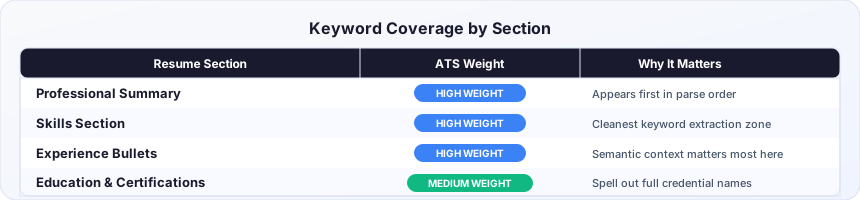
Professional Summary or Profile: This is the first section the ATS parses. Including your two or three most critical keywords here establishes them early and can influence match scoring positively.
Skills Section: This is where the ATS most reliably extracts discrete competencies. The skills section guide covers exactly how to structure this for maximum keyword coverage. Make it thorough and specific. A skills section that says “data analysis, Python, SQL, Tableau, Excel” gives the parser five clean keyword matches. Do not write skills in sentence form here.
Experience Bullets: This is where keywords in context carry the most weight for semantic ATS engines and for human readers. Every bullet that describes a responsibility or achievement is an opportunity to include role-relevant terms naturally. “Led migration of legacy ETL pipelines to Apache Airflow, reducing job failure rate by 34%” includes “ETL,” “Apache Airflow,” and implicitly signals data engineering competency.
Education and Certifications: Spell out certification full names and include the issuing organization. “Certified Scrum Master (CSM), Scrum Alliance” gives the ATS multiple matching surfaces.
The goal is for your most critical keywords to appear in at least two distinct sections of your resume. This reflects genuine competency rather than keyword insertion and performs better with AI-assisted parsers that assess contextual coherence.
Keyword Density: How Much Is Too Much?
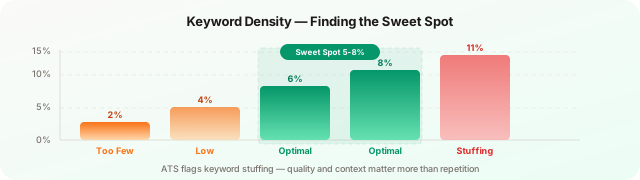
Keyword stuffing, repeating the same term four, five, or six times in an obvious way, was a viable tactic in early ATS environments. It is not anymore, for two reasons.
First, AI-assisted ATS platforms penalize unnatural repetition as a signal of manipulation rather than genuine expertise. Second, the recruiter who reads your resume after it clears the filter will see it, and it reads badly.
A practical guideline: the most critical keyword should appear 2–3 times across your resume, once in the summary or objective, once in the skills section, once in a relevant experience bullet. For a deeper breakdown by section, see the guide on keyword frequency and density. Supporting keywords appear once or twice. If a term appears more than three times, read the resume aloud and ask whether it sounds natural.
Synonyms and Variations: Include Both Forms
Many keywords have multiple legitimate forms that different companies use interchangeably. ATS configurations vary in whether they treat these as equivalent.
Some examples:
- “Project management” vs. “managing projects” vs. “program management”
- “Machine learning” vs. “ML” vs. “predictive modeling”
- “User research” vs. “UX research” vs. “usability testing”
- “Revenue growth” vs. “sales growth” vs. “top-line growth”
Where you can do so naturally, include both the noun-form and verb-form of important terms. “I have experience in project management” and “managed multiple concurrent projects” both contribute to matching. The first is a direct keyword hit; the second demonstrates practical application.
For technology certifications and product names, always spell out the full name and include the abbreviation: “Amazon Web Services (AWS),” “Search Engine Optimization (SEO),” “Generally Accepted Accounting Principles (GAAP).” This doubles your surface area for matching.
Using O*NET and LinkedIn’s Skills Taxonomy for Keyword Research
Two publicly available resources can substantially improve your keyword research for unfamiliar roles.
O*NET Online (onetonline.org) is a U.S. Department of Labor database that catalogs occupational knowledge, skills, abilities, and common tasks for hundreds of job categories. Searching your target job title gives you a standardized vocabulary of the role, the terms that labor market researchers and large HR systems have converged on. This is especially useful when applying to government roles or large enterprises that align their job descriptions to O*NET categories.
LinkedIn’s Skills taxonomy is visible through the “Skills” section of any LinkedIn profile or job posting. When you add skills to a LinkedIn profile, the autocomplete options reflect the vocabulary LinkedIn uses for matching candidates to jobs. If LinkedIn suggests “Strategic Communications” rather than “Communication Strategy,” that phrasing is more likely to match LinkedIn-sourced job postings. While this matters more for LinkedIn profile optimization than for a resume, the vocabulary is often consistent with what recruiters use in ATS configurations for the same roles.
The 2026 Semantic Layer: What ATS Infers, What It Does Not
AI-powered ATS parsing has improved meaningfully since 2023. Systems built on large language model infrastructure can now infer some skills from contextual description rather than requiring exact keyword matches.
A resume that says “built single-page applications using component-based architecture with reactive state management” is likely to surface in searches for “React developer” on modern platforms, even without the word “React.” A candidate who writes “applied supervised classification models to customer churn prediction using Python” will likely match searches for “machine learning” and “data science.”
Do not design your resume around this inference capability. You do not know which ATS the company uses. You do not know how their recruiter has configured the keyword filters. You do not know whether their system has been updated recently. The inference layer is a helpful bonus that may save you when you have a gap, but it is not a substitute for including the terms directly.
When You Legitimately Do Not Have Required Keywords
This is the most honest problem in resume optimization: what do you do when a job description requires skills you do not have?
Never fabricate. Including a keyword for a skill you cannot demonstrate in an interview is a short-term tactic that fails the moment anyone asks you about it. It also creates legal liability in roles where credentials matter.
Distinguish between absence and underrepresentation. If you have used Tableau twice in supporting roles but have never led Tableau projects, you can honestly include “Tableau” in your skills with appropriate context. “Proficient in Tableau” is not the same claim as “expert Tableau developer.”
Address gaps in your cover letter. If you are applying to a role that requires Salesforce and you have used HubSpot but not Salesforce, a brief acknowledgment, “While my CRM experience is primarily in HubSpot, I have completed Salesforce Trailhead certification and am actively building proficiency,” demonstrates self-awareness and initiative that keywords alone cannot.
Use the keyword gap as signal. If a job description has eight required skills and you have three of them, that is useful data. ATS CV Checker’s gap analysis shows you exactly which keywords you are missing against a specific job description, so you can make an informed decision about whether to apply, what to address in your cover letter, or which skills to prioritize building before reapplying.
Putting the Method Into Practice
Key takeaways
✓ Required before preferred — allocate resume space to “required” skills first; “preferred” terms matter only after required coverage is complete
✓ Two-section minimum — critical keywords should appear in your summary or skills section AND in at least one experience bullet
✓ Hard skills over soft skills — ATS systems are calibrated to discount “leadership” and “communication” as standalone entries; spend your keyword effort on specific tools
✓ Full name plus acronym — “Amazon Web Services (AWS)” gives you two match surfaces; “AWS” alone may miss some configurations
✓ Density cap at 2-3 times — repeating the same keyword more than three times does not improve scoring and reads as keyword stuffing
The full keyword extraction process, reading the JD carefully, categorizing requirements by priority, identifying specific tools and certifications, reviewing comparable postings, and mapping terms to resume sections, takes time. That is the point. A resume tailored with this method to a specific role consistently outperforms a generic resume submitted to ten roles with minimal customization.
The economics of job searching have shifted. For the fastest way to apply this keyword strategy to each specific application, the guide on tailoring your resume for each job walks through a 15-minute workflow. With AI-assisted application tools making it easier to mass-apply, recruiters are receiving more applications per role than at any point in the past decade. ATS screening thresholds have tightened in response. A well-targeted application to five roles outperforms a generic application to fifty.