99% of Fortune 500 companies and the majority of mid-sized employers use an Applicant Tracking System to filter resumes before a human sees them. These systems parse resumes into structured data, score them against job description keywords using semantic NLP, and rank candidates automatically. Workday and Greenhouse now include AI modules that evaluate skills alignment and career trajectory. Most resumes are eliminated at the parsing or scoring stage, not at the interview stage.
Roughly 99% of Fortune 500 companies and the majority of mid-sized employers use an Applicant Tracking System to filter resumes before a human ever sees them. Yet most job seekers still operate on outdated information: keyword stuffing advice from 2018, vague warnings about “ATS compatibility,” and no real understanding of what these systems actually do.
This guide covers how ATS systems work today, in 2026, including the AI-driven changes that have reshaped screening over the past three years.
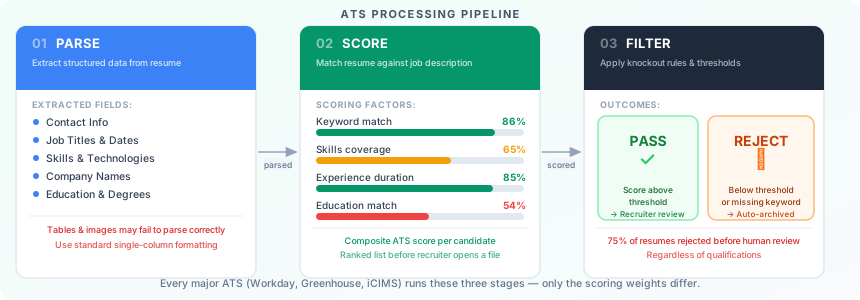
What an ATS Actually Does
An ATS is not a single algorithm. It is a workflow management platform that handles the entire hiring pipeline: job posting, application intake, resume parsing, candidate scoring, recruiter review, interview scheduling, and offer management.
For job seekers, the relevant stages are three:
1. Parsing. When you submit a resume, the ATS extracts structured data from it: your name, contact information, job titles, employers, dates, skills, education credentials, and certifications. This is pattern recognition, not intelligent reading. The parser looks for predictable markers: section headers, date formats, bullet structures. Anything that breaks from expected patterns can cause data to be misread or dropped entirely.
2. Scoring and ranking. Once parsed, your resume is evaluated against the job requisition. The system generates a match score. In older ATS implementations, this was pure keyword frequency. In modern systems, it involves semantic matching, skills inference, title seniority scoring, and years of experience extraction. Your application then sits in a ranked list, often sorted by this score before a recruiter opens a single file. For a practical guide to identifying which keywords score highest for any specific role, see the ATS resume keywords guide.
3. Filtering. Many employers configure mandatory knockout filters: minimum years of experience, specific certifications, geographic location, work authorization status, or degree requirements. Failing a knockout filter removes your application entirely, regardless of your score on other dimensions.
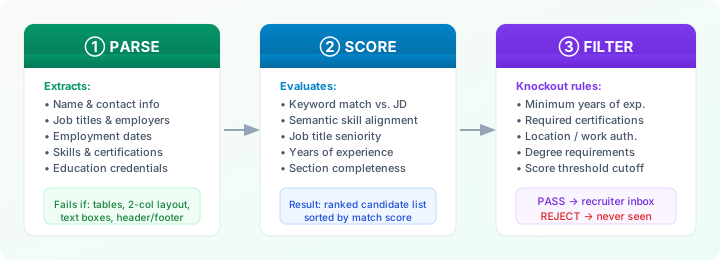
A recruiter may only review candidates ranked above a certain threshold. If your score puts you in the bottom half of 400 applicants, your resume is functionally invisible, even if you are highly qualified. For a breakdown of the most common reasons this happens, see why 75% of resumes never reach a human reviewer.
How Modern ATS Systems Work in 2026
The field shifted significantly between 2022 and 2025. Three developments changed what “ATS optimization” actually means.
Semantic Matching Replaced Pure Keyword Counting
Early ATS systems required exact keyword matches. If a job description said “project management” and your resume said “program management,” you missed the match.
Modern systems, including Workday’s AI screening layer, Greenhouse’s candidate scoring, and iCIMS’ Talent Cloud, use natural language processing models trained on millions of job descriptions and resumes. They understand that “Python programming,” “Python development,” and “Python scripting” refer to the same competency. They understand that a “Staff Engineer” title implies senior-level experience even if the word “senior” never appears.
This is meaningful progress, but it does not eliminate the need for deliberate language choices. Role-specific terminology still matters. If a company uses “Account Executive” throughout their job description and you use “Sales Representative,” semantic models will usually bridge that gap, but not always, and the scoring weight for an exact title match remains higher than a semantic equivalent.
Skills Inference and Taxonomy Alignment
A handful of ATS vendors now use structured skills taxonomies, frameworks like EMSI Burning Glass or O*NET, to classify skills from resumes. Rather than matching raw text, the system maps your skills to taxonomy nodes and then checks for overlap with the job’s required and preferred skill nodes.
This means two things. First, synonyms within a taxonomy are genuinely equivalent: if the taxonomy treats “machine learning” and “ML” as the same node, both will match. Second, skills that are not in the taxonomy may not register at all, even if they are clearly relevant. This is particularly true for emerging tools, domain-specific software, and non-English skill names.
AI-Augmented Recruiter Workflows
In 2026, most enterprise ATS installations include an AI co-pilot layer that summarizes candidates, flags potential mismatches, and suggests interview questions. This layer reads your resume differently than the scoring engine. It processes full sentences and makes inferences about career trajectory, stability, and growth.
In practice, a resume that scores well mechanically but reads incoherently to a language model may still get flagged as a weak candidate by the AI summary. Your resume needs to communicate clearly to both a parser and a sophisticated text model.
Key ATS Vendors and Their Differences
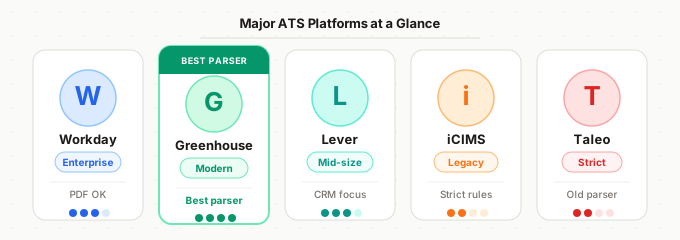
Not all ATS systems behave identically. The platform an employer uses affects how your resume is processed.
| ATS Platform | PDF Handling | AI Scoring | Semantic Matching | Notes |
|---|---|---|---|---|
| Workday | ✅ Good | ✅ Advanced | ✅ Strong | Weights job title match heavily |
| Greenhouse | ✅ Excellent | ✅ Advanced | ✅ Strong | Varies by employer config |
| Lever | ✅ Good | ⚠️ Basic | ✅ Moderate | Emphasises human review early |
| iCIMS | ⚠️ Partial | ❌ Minimal | ⚠️ Limited | DOCX often safer than PDF |
| Taleo | ❌ Strict | ❌ Minimal | ❌ Weak | Format conservatively; legacy system |
Workday is dominant in enterprise and large-cap companies. Its parser handles PDFs well but struggles with multi-column layouts and embedded tables. Workday’s scoring system weights job title match heavily, so if your previous title does not map onto the target title’s seniority level, your score drops significantly regardless of your skills.
Greenhouse is common in growth-stage tech companies. It is generally more resume-friendly and handles modern formatting better than older systems. Greenhouse integrates with third-party AI scoring tools, which means the actual ranking logic varies by employer configuration.
Lever is popular with mid-size tech and professional services firms. Its parser is relatively modern and handles PDF formatting reliably. Lever emphasizes recruiter workflow over algorithmic filtering, meaning human review tends to happen earlier in the process.
iCIMS is common in retail, healthcare, and manufacturing. It is an older platform with stricter parsing requirements. DOCX files often parse more reliably than PDFs in iCIMS environments. Table-based resume layouts frequently break.
Taleo (Oracle) is still in use at many large enterprises, particularly those that have not migrated away from legacy systems. Taleo has notoriously aggressive parsing requirements. Two-column layouts, text boxes, and non-standard section headers all cause parsing failures. If you are applying to a company known to use Taleo, format conservatively.
What ATS Can and Cannot Read
What ATS Parses Reliably
- Standard single-column text layouts
- Common section headers: “Experience,” “Education,” “Skills,” “Summary”
- Bullet points using standard characters (dash, bullet, circle)
- Standard fonts: Arial, Calibri, Garamond, Georgia, Times New Roman
- Dates in common formats: “Jan 2022,” “01/2022,” “January 2022 – March 2024”
- Contact information in the document body (not in headers/footers)
What ATS Frequently Misreads or Ignores
- Headers and footers: Most parsers extract main body text. Contact information placed in a document header, a common template design, may not be captured at all.
- Text boxes and drawing objects: Content inside text boxes in Word documents is often skipped entirely.
- Tables: Table content may be extracted in unexpected order, scrambling your experience dates and descriptions.
- Two-column layouts: The parser reads left-to-right, top-to-bottom across the full page width. A two-column layout with your job title in the left column and your dates in the right column may be parsed as a single garbled line.
- Graphics and icons: Any text embedded in an image, such as skills ratings, bar charts, or decorative icons, is invisible to the parser.
- Non-standard fonts: Creative or display fonts sometimes cause character recognition errors, particularly with special characters.
- PDFs with restricted permissions: Some PDF export settings prevent text extraction.
ATS compatibility: what gets read vs. what gets lost
✓ Reads reliably: Single-column text, standard fonts, PDF from Word, standard section headers, plain bullet points
✗ Often misses: Two-column layouts, tables, text boxes, headers/footers, images, decorative fonts, non-standard section names
How Resumes Get Scored
Understanding the scoring mechanics helps you optimize intelligently rather than randomly.
Keyword density and placement: Higher-order sections (summary, skills) often receive more weight than later sections. A keyword in your summary contributes more to your score than the same keyword buried in a 2019 job description.
Title matching: The system extracts your most recent job title and attempts to match it against the target role’s title or a seniority-equivalent title. A significant mismatch here is one of the most common reasons for low scores, even for otherwise qualified candidates.
Years of experience extraction: ATS systems calculate your total years of work experience and years of experience with specific skills based on dates. Gaps affect this calculation. If a specific skill appears in a job from 2019 and nowhere else in your resume, the system infers you have seven years of distance from that skill.
Education matching: Degree type (BA, BS, MBA, PhD) and field of study are extracted and compared against job requirements. Missing a stated educational requirement usually triggers a knockout filter or a score penalty.
Completeness signals: Many systems score higher for resumes that include all expected sections. A resume with no skills section, no summary, or no education listed scores as incomplete regardless of the content in the sections that are present.
Practical Tips for ATS Optimization
1. Mirror the job title in your summary. If the job is titled “Senior Data Analyst” and your current title is “Data Analytics Specialist,” include the phrase “senior data analyst” naturally in your summary section. Do not fabricate a title, but do reframe your experience using the target language.
2. Build a skills section that maps to the job description. Read the job description carefully and extract every technical skill, tool, methodology, and certification mentioned. Cross-reference against your actual experience and list those that apply. Place this section near the top of your resume, after the summary.
3. Use standard section headers. “Work Experience,” “Professional Experience,” or “Experience” will parse correctly. “Where I’ve Made an Impact” will not. Creativity in section headers is a liability. The ATS resume format guide covers every recognized section label and safe formatting decision.
4. Move contact information into the document body. Do not use your word processor’s header/footer feature for your name and contact details. Place them as regular paragraph text at the top of the main body.
5. Spell out acronyms and include both forms. Some ATS systems treat “ML” and “machine learning” as different terms. Write “machine learning (ML)” on first use so both forms appear in the parsed text.
6. Apply the two-page test thoughtfully. Modern ATS systems handle two-page resumes without penalty. If you have more than 10 years of relevant experience, truncating to one page often forces you to cut the keywords and context that would strengthen your score. Two pages with substance outperforms one page of compressed, keyword-thin text.
7. Test before you submit. The only way to know how your resume parses is to test it. Copy and paste your resume text into a plain text editor, and if the structure collapses into an unreadable sequence, the ATS parser will have the same experience. Better still, use a purpose-built ATS simulation tool before every application.
Testing Your Resume Against ATS
Knowing how ATS systems work is the first step. Applying that knowledge to your specific resume, against a specific job description, is where the real work happens.
Before running a check, work through these 15 proven ways to beat ATS screening to cover the optimization basics. ATS CV Checker analyzes your resume the same way an applicant tracking system does: it parses your document, extracts structured data, maps your skills against the job description, and gives you a match score with specific gaps identified. You can see exactly which required skills are missing, which section headers may cause parsing issues, and how your title alignment compares to the target role.
Before your next application, run your resume through the checker. The difference between a 52% match score and a 78% match score is often less than 20 minutes of targeted revision.