The skills section is the primary keyword extraction zone for most ATS implementations. It is scored separately from your experience bullets, and skills mentioned only in work history may not register as matched skills in some platforms. Hard skills, specific tools, platforms, and methodologies, carry far higher scoring weight than soft skills, which ATS taxonomies discount because nearly every candidate claims them. Updating the skills section for every application consistently improves match scores.
The skills section is the primary keyword extraction zone for most ATS implementations - it is scored separately from your experience bullets, and skills mentioned only in work history may not register as matched skills in some systems. Hard skills (specific tools, platforms, methodologies) carry far higher scoring weight than soft skills, which ATS taxonomies discount because every candidate claims them. Placing the skills section before your experience, and updating it for every application, consistently improves ATS match scores.
The skills section is not a formality. For most ATS implementations, it is the primary zone for keyword extraction and the most direct input into your candidate score. Recruiters use it to filter candidates by tool proficiency. AI scoring models use it to classify you into role-appropriate competency buckets. And yet it is the section that candidates most commonly fill with vague, unstrategic, or counterproductive content. The ATS resume keywords guide covers how to extract and prioritize the right terms from any job description before you decide what goes in this section.
Skills mentioned only inside work history bullets may not count toward your required skill match score in some ATS configurations, even when the word appears clearly in the document. The system treats the skills section as a separate structured field. A skill that exists only in a bullet point may be read as context rather than a declared competency, which means it misses the direct matching step entirely.
Why the Skills Section Is Critical for ATS Scoring
Most enterprise ATS platforms treat the skills section as a distinct structured field, separate from the prose in your experience bullets. When a recruiter or ATS administrator builds a job requisition, required and preferred skills are typically entered as tags or keywords. The system then specifically compares your skills section content against those tags. Understanding how ATS systems parse and score resumes clarifies why this distinction matters in practice.
This is different from how the rest of your resume is evaluated. Your work experience bullets are evaluated through keyword matching or semantic analysis of running text. Your skills section is often evaluated as a list of discrete entities - individual terms matched against a skills taxonomy. If a required skill appears in your experience bullets but not in your skills section, some ATS configurations will not register it as a matched skill, even though the word is present in the document.
The practical consequence: skills that you mention only in context - described in a work history bullet - may not count toward your required skill match score. A dedicated, explicit skills section ensures those competencies are counted.
Where to Place the Skills Section
Position matters for ATS scoring because many systems weight content found earlier in the document more heavily in their ranking algorithms.
For most roles with more than three years of relevant experience, the recommended order is: Contact Information → Summary → Skills → Experience → Education. This places your skills section in the high-weight zone before your work history, so keyword extraction happens early and prominently.
The exception: candidates with extensive, highly-recognizable experience at prestigious employers may benefit from leading with their work history, letting brand association do the initial heavy lifting. But for the majority of candidates, especially in competitive application pools, front-loading the skills section improves ATS score.
For new graduates and candidates with limited experience, see the entry-level considerations below.
Hard Skills vs. Soft Skills: How ATS Weights Them
ATS systems and their underlying skill taxonomies weight hard skills (technical, measurable, tool-specific competencies) substantially higher than soft skills in scoring.
Hard skills are explicit, verifiable, and taxonomy-aligned. When a job description requires “Salesforce,” the system looks for “Salesforce” in your resume. When it requires “Python,” it looks for Python. These matches are direct and contribute meaningfully to your score.
Soft skills - “communication,” “leadership,” “team player,” “problem solver” - present a different situation. Most ATS systems include them in taxonomies, but two issues arise. First, soft skill requirements in job descriptions are nearly universal, so they contribute less discriminatory power to candidate ranking. Second, every candidate claims them, so ATS systems generally weight them lower to avoid inflating scores with claims that cannot be verified from resume text alone.
Practical guidance: your skills section should be dominated by hard skills. Soft skills can appear in your summary as context (“managed cross-functional stakeholder relationships”) but should not take up real estate in the skills list that could be occupied by a specific tool or methodology. For detailed guidance on how to handle soft skills specifically, see how to include soft skills on an ATS resume.
What to Include in the Skills Section
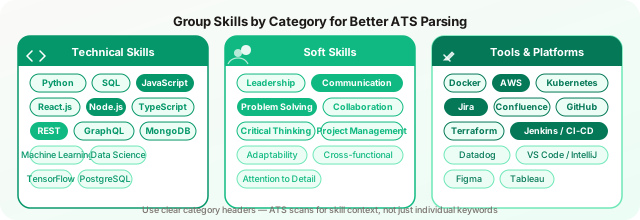
The right content for your skills section depends on your field, but the categories are consistent:
Technical tools and software. The specific platforms, applications, and systems you have worked with. For engineers: programming languages, frameworks, databases, cloud services. For marketers: CRM platforms, analytics tools, advertising platforms. For finance: ERP systems, financial modeling tools, accounting software. For operations: project management tools, supply chain systems, process improvement methodologies.
Methodologies and frameworks. Agile, Scrum, Kanban, Six Sigma, ITIL, PRINCE2, OKRs, Design Thinking. These are searchable credentials that appear in job descriptions and need to be explicitly present.
Domain expertise. Industry-specific knowledge areas: regulatory frameworks (HIPAA, GDPR, SOX), financial domains (derivatives pricing, FP&A, credit risk), technical domains (distributed systems, computer vision, NLP). These terms signal depth in ways that generic competency claims do not.
Certifications. AWS Certified Solutions Architect, PMP, CPA, CFA, Google Analytics Certified, Salesforce Administrator. List the formal name. Many ATS systems use certification matching as a filtering criterion. See how to format certifications for ATS for the full formatting guidance on credential entries.
Languages. Both programming languages and human languages, if either is relevant to the role.
What Not to Include
Microsoft Office. Unless you are applying for administrative roles where advanced Excel or PowerPoint proficiency is a genuine differentiator, “Microsoft Office” reads as a filler entry that occupies space without adding signal. Everyone who has worked in an office knows Word and Excel. If your Excel skills are genuinely advanced - financial modeling, complex VBA, Power Query - describe that specifically rather than lumping it under the Office banner.
Vague competencies stated as skills. “Leadership,” “communication,” “teamwork,” “time management,” “problem-solving.” These are traits, not skills. ATS systems may parse them into soft skill taxonomies, but they contribute almost nothing to your score and consume space that a specific tool or technology could occupy. If you can describe it better as a behavior in your experience bullets, it does not belong as a standalone skill entry.
Outdated technologies. Listing skills in superseded technologies - languages or platforms that have been deprecated or replaced in your industry - may suggest your skills are not current. Unless directly relevant to the role, prune these.
“Fast learner,” “attention to detail,” “self-starter.” These are not skills by any definition that matters in hiring.
Formatting: Grouped vs. Flat List
Both approaches are ATS-compatible, but grouped categories are preferable for most candidates.
Grouped format (organized by category):
Programming: Python, Go, TypeScript, SQL
Cloud: AWS (EC2, S3, Lambda, RDS), Google Cloud
Data: Spark, Airflow, dbt, Redshift, Databricks
Methodologies: Agile, CI/CD, Test-Driven Development
Flat format (single undifferentiated list):
Python · Go · TypeScript · SQL · AWS · Google Cloud · Spark · Airflow · dbt · AgileThe grouped format helps human readers scan quickly and understand your depth in each area. For ATS purposes, the structured text in either format parses equally well - the parser reads the words, not the organizational structure. But categorization signals seniority and depth to the recruiter who opens your file after you clear the ATS.
Avoid using tables for your skills section. Table content in Word documents frequently parses out of order or is skipped entirely by certain ATS parsers, particularly older Taleo and iCIMS implementations.
How Many Skills to List
The practical range is 15–30 skills for most candidates. Below 15, you may be under-representing your competency profile relative to the job description. Above 30, the section becomes difficult to scan and may appear padded.
The right number is driven by the job description: extract every technical skill, tool, methodology, and technology mentioned as required or preferred, and include those that genuinely apply to you. The skills section is not a complete inventory of everything you have ever touched - it is a targeted alignment with this specific role.
Skill Proficiency Levels
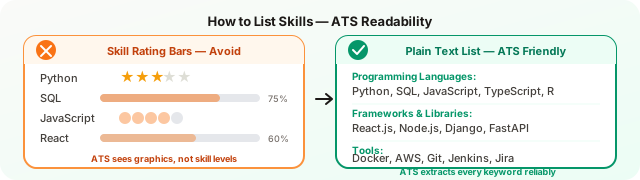
The convention of noting proficiency levels - “Python (advanced),” “Spanish (conversational)” - has a mixed track record with ATS systems. Most platforms extract the skill name and discard the parenthetical qualifier. The proficiency label is visible to human readers but contributes little to automated scoring.
Whether to include proficiency notes is therefore a question for human readers: does a recruiter for this role need to understand your level to contextualize your candidacy? For language skills and for technical skills where the distinction between working knowledge and deep expertise genuinely matters in the role, it is useful. For a generic list of tools, it adds visual clutter without meaningful signal.
Ordering for ATS Impact
Place your most in-demand and role-relevant skills first within each category. ATS systems that weight document position more heavily will pick up front-loaded terms with higher signal value. The human recruiter who scans your skills section also spends most attention on the first two or three entries in each group, so leading with your strongest assets is the right move regardless.
If you are targeting multiple different types of roles (say, both data engineering and analytics engineering positions), your skills ordering should shift accordingly. Leading with Spark and Airflow for a data engineering application, and leading with dbt and SQL for an analytics role, takes under two minutes and meaningfully improves keyword alignment. The guide to tailoring your resume for each job covers the full 15-minute workflow for updating skills per application.
Keeping Skills Consistent with LinkedIn
ATS systems in 2026 are increasingly cross-referencing resume content with public professional profiles during candidate evaluation. Several major platforms, including LinkedIn Talent Solutions and Workday, now surface LinkedIn profile data to recruiters alongside the resume. Significant discrepancies between your resume skills list and your LinkedIn skills list can create inconsistency signals that affect candidate confidence scores.
The standard should be: if a skill is on your resume, it should also be on your LinkedIn profile. LinkedIn’s skills section also affects your visibility in recruiter searches, which is a separate but parallel optimization concern.
The 2026 Skills Taxonomy Shift
Major ATS vendors are moving away from raw keyword matching toward structured skills ontologies. The most significant frameworks in use are O*NET (maintained by the US Department of Labor), EMSI Burning Glass, and LinkedIn’s proprietary skills graph, which now includes more than 40,000 recognized skills.
In practice, this means: if you write a skill exactly as it appears in these taxonomies, your term will match reliably. If you use a non-standard abbreviation or a proprietary company-internal name for a technology, it may not map to the taxonomy node and may not register as a match even if a human reader would clearly understand what you mean.
The safe approach for any technology or methodology: use the most widely recognized name, include standard abbreviations alongside full names when both are in common use (e.g., “Natural Language Processing (NLP)”), and avoid inventing category names that do not exist in the industry’s shared vocabulary.
Running a Skills Gap Analysis Before You Submit
The most direct way to know whether your skills section is optimized for a specific application is to compare it systematically against the job description. Read the posting and extract every skill, tool, and competency mentioned - required and preferred. Then check each one against your skills section.
Skills that appear in the job description but not in your section, and that you genuinely have, should be added before you submit. Skills that are listed in the posting and that you do not have should be noted as development targets, not added as false claims.
ATS CV Checker runs this comparison automatically - pasting your resume and the job description gives you an immediate read on which required skills are present, which are missing, and which appear only in your experience text but not in a recognized skill field. For most candidates, this surfaces three to six skills worth adding per application, each of which directly improves the match score.
The skills section is the highest-impact, lowest-effort optimization available on any resume. Thirty minutes of targeted revision - adding missing skills, removing noise, ordering by relevance - consistently produces a measurable improvement in ATS score. It is the right place to spend time before every application.
Key takeaways
✓ Separate field — the skills section is scored as its own structured field, not merged with experience bullet keywords
✓ Hard skills first — specific tools, platforms, and certifications carry far higher scoring weight than soft skill claims
✓ 15 to 30 skills — the practical range for most candidates; fewer under-represents you, more dilutes the signal
✓ Placement matters — putting skills before experience front-loads keywords in the high-weight zone most parsers prioritize