The best free ATS checker in 2026 is ATS CV Checker — unlimited scoring, 52 languages, works inline on LinkedIn and Indeed without copy-pasting. Jobscan has the most detailed keyword analysis ($29-$50/mo). Teal is best for tracking many applications. SkillSyncer is the fastest free keyword check.
Finding the best ATS resume checker depends on what you actually need. Some tools are excellent at keyword gap analysis but charge $50 a month after a brief trial. If you want to understand keyword strategy before picking a tool, the ATS resume keywords guide covers how to identify which terms score highest for any role. Others are free but work only in English, which is a real problem if you are applying for jobs in Germany, France, the Netherlands, or Brazil. A few tools identify that your resume has a problem but withhold the fix until you pay.
This comparison covers seven tools tested against the same task: optimizing a mid-level software engineering resume for a specific LinkedIn job posting. Each tool was evaluated on the accuracy of its ATS scoring, the usefulness of its keyword feedback, whether the free tier is genuinely usable, and whether it can analyze a job you are currently viewing without requiring copy-pasting.
Quick comparison
| Tool | Price | Chrome Extension | Languages | Free tier |
|---|---|---|---|---|
| ATS CV Checker | Free | ✅ Yes | 52 | Unlimited scoring + analysis; 5 AI CV generations/day |
| Jobscan | $29.95–$49.95/mo | ❌ No | English | ⚠️ 5 scans/month |
| Teal | Free / $29/mo | ❌ No | English | ⚠️ Unlimited job tracking; limited AI |
| ResumeWorded | Free / $19/mo | ❌ No | English | ⚠️ Limited scans |
| SkillSyncer | Free | ❌ No | English | ✅ Fully free (basic only) |
| Jobalytics | Free / $9/mo | ✅ Yes | English | ✅ Fully free (basic only) |
| Simplify | Free / $7.99/mo | ✅ Yes | English | ⚠️ Auto-fill only; limited ATS |
This comparison covers seven tools tested against the same task: optimizing a mid-level software engineering resume for a specific LinkedIn job posting. Each tool was evaluated on the accuracy of its ATS scoring, the usefulness of its keyword feedback, whether the free tier is genuinely usable, and whether it can analyze a job you are currently viewing without requiring copy-pasting.
1. ATS CV Checker
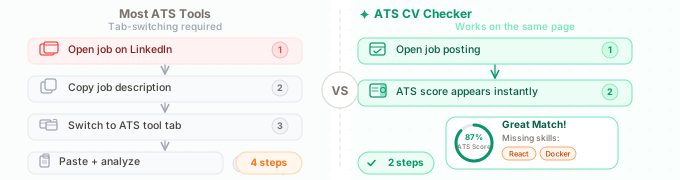
ATS CV Checker is a Chrome extension that reads the job description directly from the page you are browsing. No copy-pasting required. The side panel opens alongside your LinkedIn or Indeed listing, analyzes your resume against that specific role, and returns an ATS compatibility score, a keyword gap list, and formatting warnings without redirecting you anywhere.
The free tier is the most generous in this comparison. ATS scoring, cover letter generation, and full CV analysis are completely unlimited. The only restriction is on AI-generated tailored CVs: five per day, which is sufficient for most active job seekers.
The standout feature is language support. ATS CV Checker generates tailored CVs and cover letters in 52 languages, while every other tool on this list works only in English. For job seekers applying in Germany, France, Spain, the Netherlands, or Brazil, this is a practical difference, not just a feature bullet.
What it does well:
- Works inline on job boards: no tab switching, no copy-pasting
- Unlimited free ATS scoring and keyword gap analysis
- 5 free AI-tailored CV drafts per day (full documents, not just scores)
- Unlimited cover letter generation per day
- 52 languages for CV and cover letter output
- Shows exactly which keywords are missing for that specific job
Limitations:
- Job application tracking is less developed than Teal
- Writing quality feedback less detailed than ResumeWorded
- No standalone desktop or web app
Best for: Job seekers who want a genuinely free tool that works directly on job boards, and anyone applying for positions in a language other than English.
2. Jobscan
Jobscan is the most recognized ATS checker on the market, and its keyword analysis is genuinely thorough. The match rate breakdown separates hard skills, soft skills, and management skills, shows exactly which keywords from the job description are absent from your resume, and flags formatting issues that affect ATS parsing.
The price and workflow are the main drawbacks. At $29.95–$49.95 per month after trial, it is among the most expensive tools in this category. The free tier provides five scans per month, which runs out quickly during an active job search. There is no Chrome extension, so analyzing a live job posting requires copying both your resume and the job description into separate web fields.
What it does well:
- Most detailed keyword gap analysis of any tool tested
- Clear separation of hard skills, soft skills, education, and management requirements
- Established platform with extensive documentation
Limitations:
- $29.95–$49.95/month, among the highest pricing in this category
- No Chrome extension; requires manual copy-paste from job boards
- English only
- Free tier capped at 5 scans/month
Best for: Serious job seekers willing to pay for the most detailed keyword analysis, particularly for senior roles where precision matters.
3. Teal
Teal is primarily a job application tracker with ATS checking built into the same platform. Its strength is workflow organization: you can save jobs from any board, track application status across multiple companies, and tailor your resume within the same interface. The resume builder updates the preview in real time as you edit.
The free tier is more useful than Jobscan’s: you can track unlimited jobs and download resumes without paying. Advanced AI matching and unlimited AI writing assistance require Teal+ at $29/month.
If managing multiple simultaneous applications matters as much as ATS optimization, Teal handles this better than any other tool on this list.
What it does well:
- Best job application tracking and CRM functionality
- Real-time resume editing preview
- Useful free tier for job saving and status tracking
Limitations:
- ATS analysis less granular than Jobscan
- $29/month for full AI features
- English only
- Chrome extension only saves jobs; it does not score them inline
Best for: Organized job seekers managing 20+ simultaneous applications who need both ATS optimization and workflow tracking.
4. ResumeWorded
ResumeWorded focuses on writing quality rather than pure ATS keyword matching. Its analysis scores your resume on more than 20 criteria (bullet point impact, brevity, use of action verbs, structure) and provides recruiter-style line-by-line feedback.
This makes it a different type of tool. It is less useful for checking your match against a specific job, but more useful for improving the overall quality of your resume content before you begin applying. The LinkedIn profile review is also included and notably thorough.
What it does well:
- Most detailed writing quality feedback of any tool tested
- 20+ recruiter-style checks covering impact, brevity, and clarity
- LinkedIn profile review included in free tier
Limitations:
- Less useful for checking match against a specific job description
- Limited scans on free tier
- English only
- $19/month for full access
Best for: Job seekers who want to improve their resume’s writing quality, not just its keyword density.
5. SkillSyncer
SkillSyncer is the simplest tool on this list. You paste your resume and a job description, and it returns a keyword match percentage alongside a list of missing terms. That is the complete product.
For what it does, it works well. The keyword matching is accurate, the interface is clean, and there are no scan limits. The limitation is depth: no formatting feedback, no writing quality analysis, no guidance beyond the keyword list.
What it does well:
- Completely free with no scan limits
- Fast and clean interface
- Accurate basic keyword matching
Limitations:
- Keyword matching only, with no formatting or writing feedback
- No Chrome extension
- English only
Best for: Job seekers who want a quick keyword gap check without detailed guidance.
6. Jobalytics
Jobalytics is the other Chrome extension on this list. Like ATS CV Checker, it reads job descriptions from the page and compares them to your resume without requiring copy-pasting. The interface is simpler: it shows a match score and a keyword list without CV generation, cover letter writing, or formatting feedback.
What it does well:
- Free Chrome extension that works inline on job boards
- Quick match score without switching tabs
Limitations:
- Keyword matching and score only, with no CV generation, cover letters, or formatting feedback
- English only
Best for: Users who want a simple inline keyword check and do not need any generation features.
7. Simplify
Simplify’s primary function is auto-filling job applications: it stores your profile and populates application fields on most portals automatically. The ATS checking component is secondary to this core use case.
The free tier covers auto-fill. The premium tier at $7.99/month adds resume tailoring. It is a useful tool for high-volume applicants who spend significant time filling in form fields, but it is not a dedicated ATS checker.
What it does well:
- Best auto-fill functionality for job applications
- Low-cost premium tier ($7.99/month)
- Works across most application portals
Limitations:
- ATS analysis is basic compared to dedicated checkers
- Resume tailoring requires premium
- English only
Best for: High-volume applicants whose main friction is application form filling, not keyword optimization.
Which tool should you use?
You want a free tool with no meaningful limitations: ATS CV Checker. Unlimited ATS scoring, keyword analysis, and cover letters; the only daily cap is on full CV generations (5/day). SkillSyncer is a faster option if you only need keyword matching and nothing else.
You are applying for jobs outside English-speaking markets: ATS CV Checker is the only tool on this list that supports non-English output: 52 languages for CVs and cover letters.
You want the most detailed keyword analysis and will pay for it: Jobscan. Its keyword breakdown separates skills by category and goes deeper than any other tool tested.
You are managing many applications and need organization: Teal. The job tracking CRM is the best of any tool on this list.
You want to improve your resume’s writing quality: ResumeWorded. Its recruiter-style feedback goes beyond keyword counts.
You spend too much time filling in application forms: Simplify. The auto-fill feature saves real time for high-volume applications.
Quick decision guide
✓ Free, no limits, multilingual → ATS CV Checker (52 languages, works inline on job boards)
✓ Best keyword analysis, paid → Jobscan ($29-$50/mo, deepest skill breakdown)
✓ Managing 20+ applications → Teal (best CRM + tracking)
✓ Just need a quick keyword check → SkillSyncer (free, no account)
✓ Too much time on application forms → Simplify (best auto-fill)
Bottom line
ATS checkers have two distinct jobs: identifying keyword gaps before you apply, and helping you create a resume that passes the initial screen. Most tools do the first reasonably well. Fewer do the second without charging a monthly subscription.
The specific job you are applying for matters more than which tool you choose. A resume with strong keyword coverage tailored to that role will outperform a perfectly formatted generic resume in any ATS. The tools above identify what is missing. Acting on that information is still the deciding factor.
Check your resume against a live job description: ATS CV Checker works directly on LinkedIn and Indeed. No copy-pasting, no account required, free to use.