Version 1.8.0 of ATS CV Checker adds three features: a referral program that gives both you and a friend 2 extra quick checks and 3 bonus CV generations, shareable score badges for scores of 75% and above, and monthly usage limits for free accounts (5 quick checks and 3 full analyses per month, resetting on the 1st).
Today we are releasing version 1.8.0 of ATS CV Checker. This update focuses on growth mechanics that benefit both new and existing users, rather than changes to how the analysis itself works.
Here is what is new and how each feature works in practice.
The Referral Program
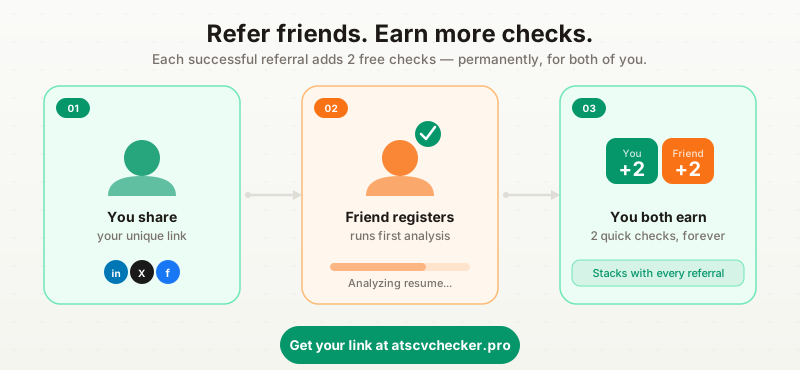
The most visible new addition is the referral system. If you have an account, you now have a personal referral link. When someone signs up and runs their first analysis using your link, you both receive 2 extra quick checks and 3 bonus CV generations added to your account permanently.
These bonus checks stack. Refer three people and you have 6 additional quick checks and 9 bonus CV generations on top of the standard monthly limit.
Where to find your referral link:
- In the extension: open the side panel and go to the Profile tab. There is a “Refer a Friend” section near the bottom with your unique link and share buttons for LinkedIn, X, and Facebook.
- In the web app: click “Referral” in the left sidebar. You will see your link, share options, and a counter showing how many people have signed up using your link.
The referral link also works as a direct landing page. Sharing atscvchecker.pro/refer?code=YOURCODE takes your friend to a page that explains the tool with your referral code pre-applied. When they register, the connection happens automatically.
The bonus credits are permanent, not expiring at month end. They sit on top of your monthly allocation. So if your monthly limit resets to 5 quick checks on the 1st, but you have earned 4 bonus checks from referrals, you effectively have 9 available.
Score Sharing
If your match score for a job comes in at 75% or above, share buttons now appear below the score breakdown in the extension and on the analysis page in the web app.
Clicking a share button generates a small badge image showing your score and the tool name. This badge links back to the score details so anyone who clicks it can see what the score represents.
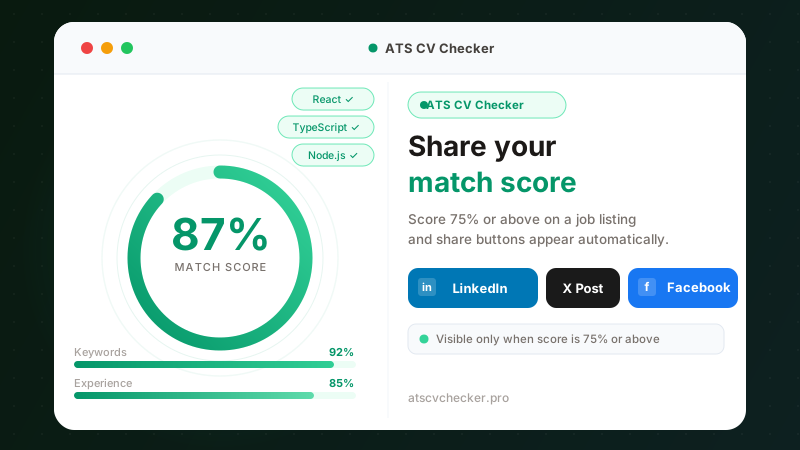
The 75% threshold is intentional. Scores below that tend to reflect a genuine gap between the resume and the job requirements, so the share prompt only appears when the result is genuinely strong.
One thing worth knowing: the score you see measures keyword match, experience alignment, education, and role fit. It reflects how well your resume is written for that specific posting. A high score on one job does not transfer to another with different requirements.
The share prompt only appears when the score is genuinely strong. A 75% match or higher means the tool found solid alignment between your resume and the job requirements.
What the badge shows:
- Your overall match percentage
- The tool name (so recipients know what generated the score)
- A link to the results page for context
You can share to LinkedIn, X (formerly Twitter), or Facebook, or copy a direct link. The image is generated server-side with your score baked in, so it displays correctly in social media previews.
Monthly Usage Limits
This is the change most likely to affect people who use the tool frequently.
Free accounts now have a monthly allocation:
- 5 quick checks per month (the fast match score you see on job listings)
- 3 full analyses per month (the detailed breakdown with section scores, missing keywords, and improvement suggestions)
These reset on the 1st of each month. The count appears in the extension header as a small colored dot. Green means you have plenty remaining, orange means you are running low, and red means you are at the limit.
Quick checks are the scores that appear automatically when you browse LinkedIn or Indeed job listings. Full analyses are the detailed reports you trigger manually with the “Analyze” button. Both types count separately against your monthly limit.
If you run out:
A registration prompt appears if you are using the tool without an account. Creating a free account restores your full monthly allocation and also gives you access to the referral program.
If you already have an account and hit the limit, you can earn more checks through referrals (each successful referral adds 2 quick checks permanently) or wait for the monthly reset.
The goal with these limits is not to make the tool less useful. It is to create a reason for people who found value in it to tell others about it. The referral program and the limits work together toward that end.
What Has Not Changed
The analysis engine itself is unchanged in this release. The scoring algorithm, keyword extraction, section detection, and the way the tool reads job postings are all the same as v1.7.x.
Multi-language support continues to work as before. The tool handles English, German, French, Spanish, and other European languages. The language mismatch warning appears when it detects that your resume and the job posting are in different languages.
The extension also still works on the same job boards: LinkedIn, Indeed, Glassdoor, and any other site where it can read a job description from the page.
How to Get v1.8.0
If you have automatic updates enabled in Chrome (the default), the extension updates in the background. You may need to restart Chrome or reload the extension from chrome://extensions if you do not see the new features.
The web app at atscvchecker.pro is already running the updated version.
If you want to verify which version you have, open the extension side panel and check the account section. Version 1.8.0 shows the quota badge in the header.
Key takeaways:
- The referral program gives both parties 2 extra quick checks and 3 bonus CV generations when a referred friend runs their first analysis
- Score sharing appears automatically for match scores of 75% and above
- Free accounts get 5 quick checks and 3 full analyses per month, resetting on the 1st
- Referral credits are permanent and stack on top of the monthly limit