ATS systems don't penalize resume length. They parse content. The one-page rule originated from fax limitations and early parsing failures, neither of which applies in 2026. The practical guideline: under 3 years of experience, one page. Three to ten years, whatever fits without cramping. Over ten years, two pages by default. Recruiters spend an average of 7.4 seconds on initial review, which favors concise writing, not an arbitrary page limit.
Recruiters spend an average of 7.4 seconds on initial resume review, according to a Ladders eye-tracking study. That number drives the one-page myth. But ATS systems don’t care about page count - they parse content. The one-page rule came from fax limitations and early parsing failures, neither of which applies today. Under three years of experience: one page. Three to ten years: whatever fits without cramping. Over ten years: two pages by default.
Few pieces of resume advice have caused more unnecessary anxiety than the one-page rule. Candidates with twelve years of experience compress their careers into a dense, unreadable block of text. Others spend hours cutting substantive content to hit an arbitrary length. The rule exists. It is largely obsolete. Here is where it came from and what actually matters now.
Where the One-Page Rule Came From
The one-page rule has two origins, and neither of them applies to modern hiring.
The first is physical. In the era of faxed and mailed applications, multi-page documents got separated, shuffled, or lost. One page stayed together. This was a genuine operational constraint, not a preference about content.
The second is early ATS limitations. First-generation applicant tracking systems in the late 1990s and 2000s were unreliable at parsing multi-page documents. Page breaks introduced parsing errors. Some systems only ingested the first page of text. Advising candidates to use one page was, in that context, practical technical guidance.
Neither condition exists in 2026. Digital applications are submitted as PDFs or through structured form fields. Modern ATS platforms parse multi-page documents without difficulty. The constraint that generated the rule is gone, but the rule persists, mostly through career counselors and online forums that have not updated their guidance.
What ATS Actually Does with Page Count
ATS systems do not penalize two-page resumes. They do not score length. They parse content.
What matters to an ATS is whether the content it needs is present and correctly formatted: the right keywords, the right credentials, a work history structured so the parser can extract dates, titles, and employers. A two-page resume that is cleanly formatted will parse better than a one-page resume that uses 9-point font and invisible margins to cram in content. For the full picture of what ATS evaluates and how to format for maximum compatibility, see the ATS-friendly resume format guide.
One formatting consideration worth flagging: resume parsers can sometimes struggle with content that crosses a page break mid-sentence or mid-bullet. This is an argument for thoughtful formatting, not for reducing your resume to a single page.
The Actual Length Guidelines
Resume length should match the depth of relevant experience. Here is a framework that reflects what hiring managers and recruiters consistently indicate in practice:
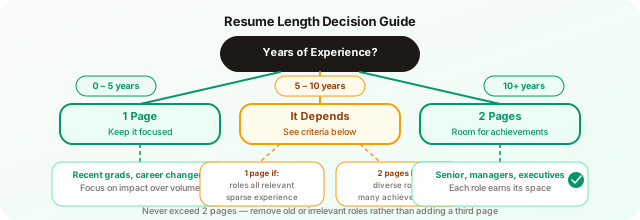
0 to 3 Years of Experience: One Page
At this stage, your professional history is thin by definition. Trying to fill two pages means padding - adding coursework, minor projects, or non-essential skills that dilute the signal of what you actually bring. One focused page reads as confident and well-edited. Two pages reads as not knowing what to cut. For how to structure a strong one-page resume when experience is limited, see the entry-level ATS resume guide.
Exception: if you have significant internship experience, published research, or a portfolio of substantial side projects, a second page can be justified. The test is whether the content is genuinely relevant to the role, not whether it fills space.
3 to 10 Years of Experience: One or Two Pages
This range is where individual judgment matters most. Ask one question: can you represent your relevant experience, achievements, and skills completely on one page without compromising readability?
If yes, one page is cleaner.
If no, and you are reducing font to 10pt, cutting meaningful achievements, or using half-inch margins, go to two pages. A two-page resume with room to breathe communicates more than a one-page resume that looks like it is trying to escape.
10 or More Years of Experience: Two Pages
A professional with a decade or more of relevant experience cannot reasonably represent that career on one page without making cuts that damage the quality of the application. The expectation from most hiring managers at this career stage is two pages. For director-level and above, the senior executive ATS resume guide covers how to structure a two-page document without losing keyword coverage.
The question at this level is not “can I fit on one page” but “what do I cut from two pages.” Experience from more than 15 years ago typically warrants a brief listing (company, title, dates only) unless it is directly relevant to the current application.
What Two Pages Should Never Become
Three pages or more is appropriate for academic CVs, federal government applications (which follow entirely different conventions), and certain medical or research-focused applications. For every other professional context, if you are approaching three pages, the document needs editing, not expansion.
What Hiring Managers Actually Say
Recruiter surveys conducted over the past several years consistently show that most experienced recruiters prefer a well-organized two-page resume over a cramped one-pager. The reasoning is straightforward: a one-page resume that sacrifices readability to meet a length constraint makes their job harder, not easier.
This preference intensifies for senior roles. A hiring manager evaluating a VP of Engineering candidate who submits a one-page resume may read it as a signal that the candidate has not done much, or lacks the self-awareness to know what is relevant.
The one-page preference that does survive is in specific contexts: startup environments where concision is a cultural value, and entry-level mass hiring where recruiters are processing hundreds of applications and want to make fast cuts. Even in those cases, the preference is about density of signal, not literal page count.
Most experienced recruiters prefer a well-organized two-page resume over a cramped one-pager. Their reasoning is practical: a one-page resume that sacrifices readability to hit an arbitrary length target makes their job harder. A hiring manager evaluating a senior candidate who submits a one-page resume may read it as a signal that the candidate has not done much, or does not know what is relevant to include.
The Density Problem: Why Cramming Backfires
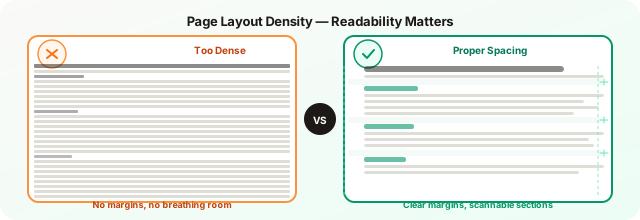
Squeezing your resume onto one page when the content warrants two creates a specific set of problems that candidates underestimate:
Readability for humans: Fonts below 11pt, margins below 0.6 inches, and line spacing below 1.1 make a document physically uncomfortable to read. A recruiter spending six to ten seconds on initial scan will spend that time on a document that does not require effort to parse.
Parsing problems for ATS: Dense layouts sometimes cause ATS parsing errors. Content packed into narrow columns, text boxes, or tight tables can be extracted incorrectly or missed entirely. Standard formatting with normal margins is safer for automated parsing.
Signal-to-noise degradation: When you cut achievements to meet a length target, you are cutting the most valuable content on your resume, the quantified proof that you can do the job. Keeping a marginal certification and cutting a meaningful metric is a trade that consistently makes resumes weaker.
What to Cut When Reducing Length
When editing for length, cut in this order:
- Objective statements - replace with a tight summary or remove entirely
- Responsibilities without achievements - every bullet should show impact, not just describe duties
- Outdated technology and tools - skills from more than 10 years ago rarely strengthen an application unless the job specifically requires them
- High school and early undergraduate details - unless you graduated within the last three years
- References available upon request - this phrase has been obsolete for 20 years and still appears on resumes
- Redundant skills - listing “Microsoft Office” in your skills section while your experience section demonstrates document-intensive work is repetition, not emphasis
- Old jobs held for less than a year that are not relevant to the current application
Do not cut: quantified achievements, role-defining skills that appear in the job posting, and any experience that explains career progression or addresses potential recruiter concerns.
The Six-Second Reality and What It Means for Length
Eye-tracking research on recruiter behavior shows that initial resume review averages between six and ten seconds. In that window, a recruiter is scanning for four or five data points: title, companies, career progression, a signal of scale or achievement, and red flags.
For length, this means you should structure your resume so the highest-value information appears in the top half of page one, with the rest of the document supporting what a recruiter who invests more time will find. Fitting within the six-second window is not an argument for one page.
A two-page resume that front-loads impact beats a one-page resume that buries the most relevant content in a dense block at the bottom.
Making Page Two Work
Page two of your resume is the section most likely to go unread if the application does not make it past initial screening. That is an argument for making page one strong, not for eliminating page two.
What belongs on page two: older role details, certifications, education (if not a recent graduate), additional projects, publications, or language skills. What does not belong on page two: your most recent and relevant role, your primary quantified achievements, or your core skills.
One practical tip: include your name and a page number in the footer of page two. When resumes are printed or separated in file systems, a floating second page with no identifying information becomes useless.
The Bottom Line
Resume length is a function of relevant content, not a rule to follow. One page is right for early-career candidates. Two pages is appropriate, and often better, for most experienced professionals. The goal is a document that is complete, readable, and easy to scan, at whatever length that requires.
Candidates who spend hours cutting meaningful content to fit a one-page constraint are almost always making their resumes worse, not better.
Key takeaways
✓ 0-3 years of experience — one focused page; two pages at this stage reads as not knowing what to cut
✓ 3-10 years — one or two pages depending on whether everything fits without compromising readability
✓ 10 or more years — two pages is the default expectation; cutting to one page may signal a thin record
✓ ATS does not penalize length — parsers score content, not page count; format cleanliness matters more than keeping to one page
✓ Cut in order — objective statements first, then duty-only bullets, then outdated tools, then early career details before 2016