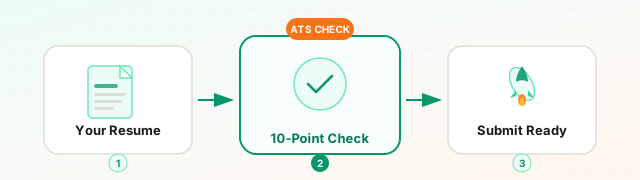
Ten pre-submission checks catch the errors most likely to cause ATS rejection: contact info in the document body, clean plain-text extraction, standard section headers, correct file format, keyword coverage from the job description, no tables in experience, no text boxes, consistent date formatting, a professional email, and a tailored summary. Each check takes under 2 minutes and most fixes take under 30 seconds.
Before submitting any resume, ten checks catch the errors most likely to cause ATS rejection: contact information in the document body (not a Word header), clean plain-text extraction, standard section header labels, correct file format, keyword coverage from the job description, no tables in the experience section, no text boxes, consistent date formatting, a professional email address, and a tailored professional summary. Each check takes under two minutes and most can be fixed in seconds.
Most resume advice focuses on what to write. This checklist focuses on what to check before you submit - the ten specific verifications that catch the errors most likely to cause ATS rejection.
Run through this before every application. It takes under 20 minutes. The 15 hours you might spend wondering why your job search stalled is not a good trade.
Check 1: Contact Information Is in the Document Body
What to verify: Your name, phone, email, city/state, and LinkedIn URL are placed as regular paragraph text - not in a Word document header, not in a text box, not inside a table cell.
How to check: Open your Word document. Press Ctrl+Home to jump to the beginning. Is the first visible text in the main editing area your name? Click once on your name. Does a “Header” zone activate (blue dashed border, rest of document grays out)? If yes, your contact information is in the header and most ATS parsers will not extract it.
Quick fix: Cut the content from the header zone. Close the header. Paste as regular text at the top of the document body.
Check 2: Plain Text Extraction Is Clean
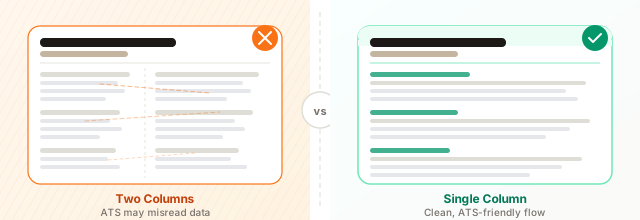
What to verify: When you strip all formatting, the structure of your resume still makes sense - dates are next to the right employers, bullet points are intact, sections are in the right order.
How to check: Select all your resume content (Ctrl+A), copy it, and paste it into Notepad or a blank text editor with no formatting support. Read from top to bottom. Does it hold together?
Red flags: Content from two columns mixed together (“Python | Senior Analyst, Acme Corp | JavaScript | Chicago, IL”), dates separated from employers, bullet points merged into run-on sentences.
Quick fix: Switch to a single-column layout and remove tables from your experience section.
Check 3: Section Headers Use Recognized Labels
What to verify: Every section header uses a label that ATS parsers recognize.
Recognized: Professional Experience, Work Experience, Employment History, Education, Skills, Technical Skills, Core Competencies, Professional Summary, Summary, Certifications, Licenses.
Not recognized (and therefore not reliably parsed): “My Journey,” “What I Bring,” “Where I’ve Made an Impact,” “Areas of Expertise and Passion,” “Career Highlights.”
How to check: Read each section header. Could you replace it with one of the recognized alternatives without losing meaning? If yes, do it.
Check 4: Job Description Keywords Are Present
What to verify: The top 8-10 required skills and qualifications from the job description appear somewhere in your resume.
How to check:
- Open the job description and highlight every required skill, tool, and qualification
- Search your resume for each highlighted term (Ctrl+F in Word)
- Mark which ones are missing
What to do with gaps: For any required skill you genuinely have but did not mention: add it to your skills section or weave it into an experience bullet. For any required skill you do not have: do not add it.
This check alone is the most impactful thing you can do before submitting. A resume with 40% keyword coverage against a job description is a significantly different candidate than one with 75% coverage.
Keyword coverage is the single highest-impact check in this list. A resume with 40% keyword coverage against a job description scores the same as an unqualified candidate. Closing that gap to 75% takes under 15 minutes and changes your match from screened-out to competitive.
Check 5: No Images, Graphics, or Skill Ratings
What to verify: Your resume contains no photographs, logos, decorative icons, skill rating bars, star ratings, or dot scales.
How to check: Look at your resume. Is there anything on the page that is not text? Skills sections with visual ratings (filled circles, progress bars) are the most common offender, particularly in templates from Canva, Etsy template sellers, or design-forward resume sites.
Why it matters: Graphics do not parse. A skill rating bar is visually present but textually invisible. An ATS extracting your resume sees the text around it but not the bar itself.
Quick fix: Replace visual skill ratings with text descriptions: “Python (advanced, 5 years production use)” or simply remove the ratings and list skills as plain text.
Check 6: Dates Are Consistent and Complete
What to verify: All employment dates follow the same format and include both month and year for start and end dates.
Consistent format (choose one):
- January 2022 – March 2024
- Jan 2022 – Mar 2024
- 01/2022 – 03/2024
Inconsistent format (fix this):
- January 2022 – 2024 (missing month on end date)
- Jan 2022 to March 2024 (mixed abbreviation and full name)
- 2022 – Present (missing months for non-current role)
Why it matters: ATS systems calculate your years of experience in each role from your dates. Incomplete or inconsistent dates produce unreliable experience calculations and sometimes cause the parser to flag your work history as incomplete.
For your current role: “January 2024 – Present” is correct. Do not leave the end date blank - some parsers interpret a blank end date as a missing field and apply a penalty.
Check 7: Your Most Recent Title Matches the Target Role (Or Is Close)
What to verify: The gap between your most recent job title and the target title is not more than one level.
Why it matters: ATS systems weight your most recent title heavily in scoring. Applying for “Senior Product Manager” with a most recent title of “Product Coordinator” creates a significant scoring gap that strong keyword coverage may not fully compensate for.
What to do if the gap exists: If your responsibilities exceeded your official title, consider listing “Product Manager (functional title, reporting to Director of Product)” alongside your official title. Be prepared to explain honestly. If your title mismatch is significant and intentional (deliberate career transition upward), address it in your cover letter, not on the resume.
Check 8: File Type Matches the Application System’s Preference
What to verify: You are submitting the right file format for the specific ATS receiving your application.
Default choice: PDF when no preference is stated. PDF preserves formatting and is well-handled by modern ATS platforms (Greenhouse, Lever, Workday).
When to choose DOCX: When the application explicitly requests Word format. Some older Taleo and iCIMS configurations extract DOCX more reliably than PDF.
When format matters less: LinkedIn Easy Apply, Indeed Easy Apply, and similar platforms convert your file anyway. The underlying structure (no tables, no multi-column) matters more than the file format.
File name: Name your file “FirstName-LastName-Resume.pdf” or “FirstName-LastName-Resume-CompanyName.pdf.” Avoid “My Resume FINAL v3 (1).pdf” - it looks disorganized and some ATS systems use the filename in parsing metadata.
Check 9: Employment Gaps Are Addressed, Not Hidden
What to verify: If you have a gap of more than three months in your recent work history, there is some explanation visible in your resume.
What counts as an explanation: A brief note in the affected period (“Career break: March 2024 – January 2025 - family caregiving”), a freelance/consulting entry covering the period, or a certification or course listed with a completion date during the gap.
Why not hide it: The ATS calculates experience timelines. Your LinkedIn profile has your dates. Any attempt to obscure a gap through date formatting or vague timeline representation will be noticed, and the appearance of deliberate obscuration is more damaging than the gap itself.
What you do not need to explain in detail: The circumstances of the gap. “Family caregiving” is sufficient. “Health-related leave” is sufficient. You are not required to provide medical or personal details.
Check 10: Your Summary Is Targeted to This Specific Role
What to verify: Your professional summary mentions the specific type of role, industry, and level you are applying for - not a generic description of your career.
Generic (will not help your ATS score): “Experienced professional with a track record of success across multiple industries, bringing strong communication skills and results-driven approach to new opportunities.”
Targeted (will help): “Senior financial analyst with 8 years of FP&A experience in retail and e-commerce, specializing in three-statement modeling, board-level reporting, and inventory-driven P&L management. Currently targeting VP Finance or Head of FP&A roles at high-growth consumer brands.”
The targeted version contains: level signal (senior, 8 years), specific function (FP&A), industries (retail, e-commerce), specific skills (three-statement modeling, board reporting, P&L), and role targeting (VP Finance or Head of FP&A, high-growth consumer brands). Every phrase is an ATS keyword match and a credibility signal for the human reviewer.
Update your summary for each significant application. It takes five minutes and has an outsized impact on your match score.
Key takeaways
✓ Contact in body — name, phone, and email must be in regular paragraph text, not inside Word headers or footers
✓ Keyword coverage — check the top 8-10 required skills from the job description and add any you have but left out
✓ Standard section headers — “Professional Experience” and “Skills” parse reliably; creative labels do not
✓ Consistent dates — use one format throughout and include both month and year for every role
✓ Tailored summary — update it for each application to reflect the specific role, level, and industry
The last check: Run your resume through ATS CV Checker against the specific job description. The automated analysis catches keyword gaps, section weighting issues, and formatting problems that are easy to miss when you are reading your own resume. The 10 manual checks above catch the structural issues; the automated analysis catches the content gaps. Together, they take under 30 minutes and make a measurable difference in your interview rate. Once you are satisfied with your resume, use the Application Autofill feature to populate the job application form from your saved profile instead of retyping everything by hand.